> ## Documentation Index
> Fetch the complete documentation index at: https://mrge.mintlify.site/llms.txt
> Use this file to discover all available pages before exploring further.
# Custom rules
> Learn how to define custom rules
**Custom rules** allow you to define specific rules that cubic's AI reviewer will enforce on every pull request.
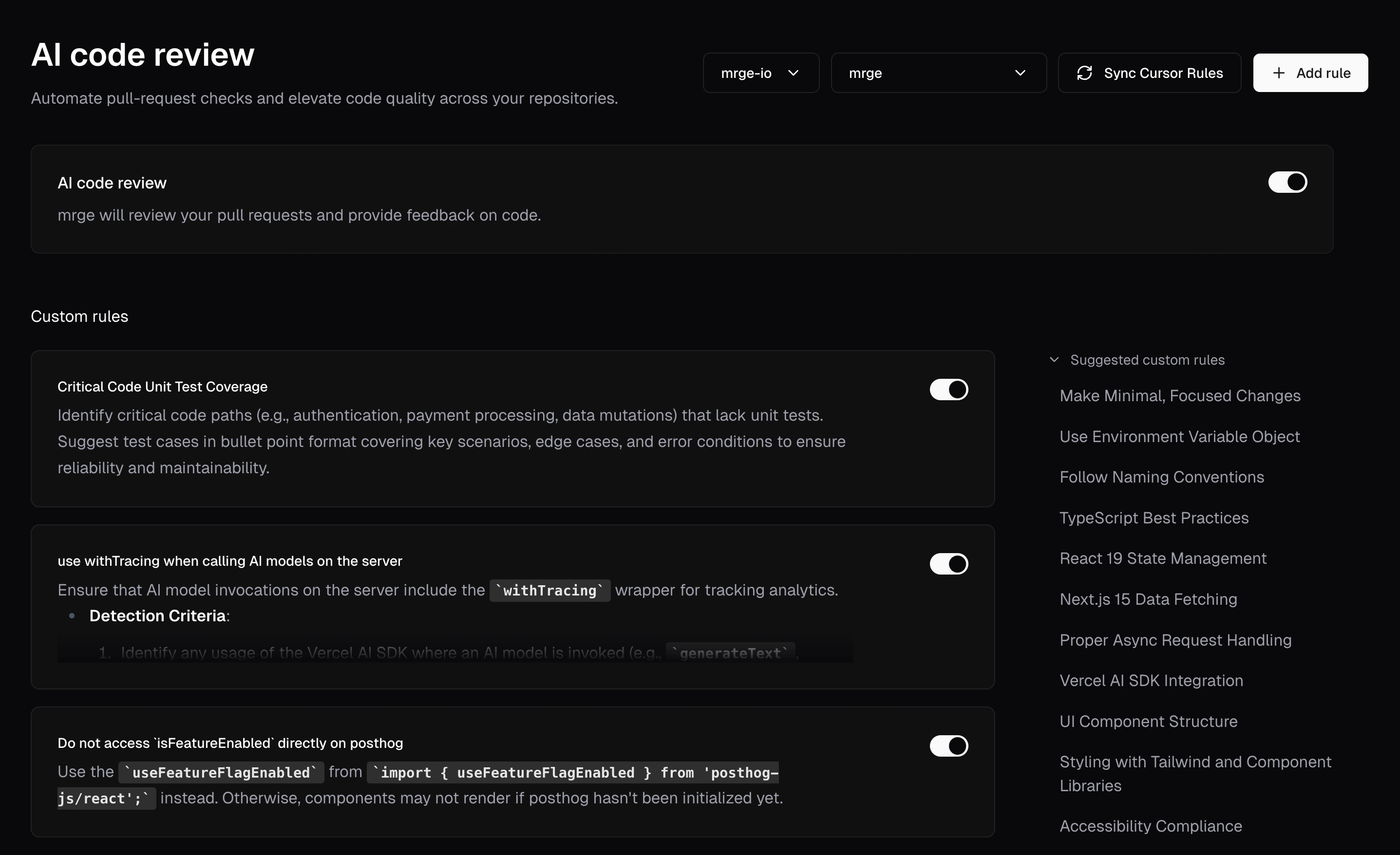 ## Creating a custom rule
To define a rule, navigate to the **AI review** page in cubic and click "Add rule".
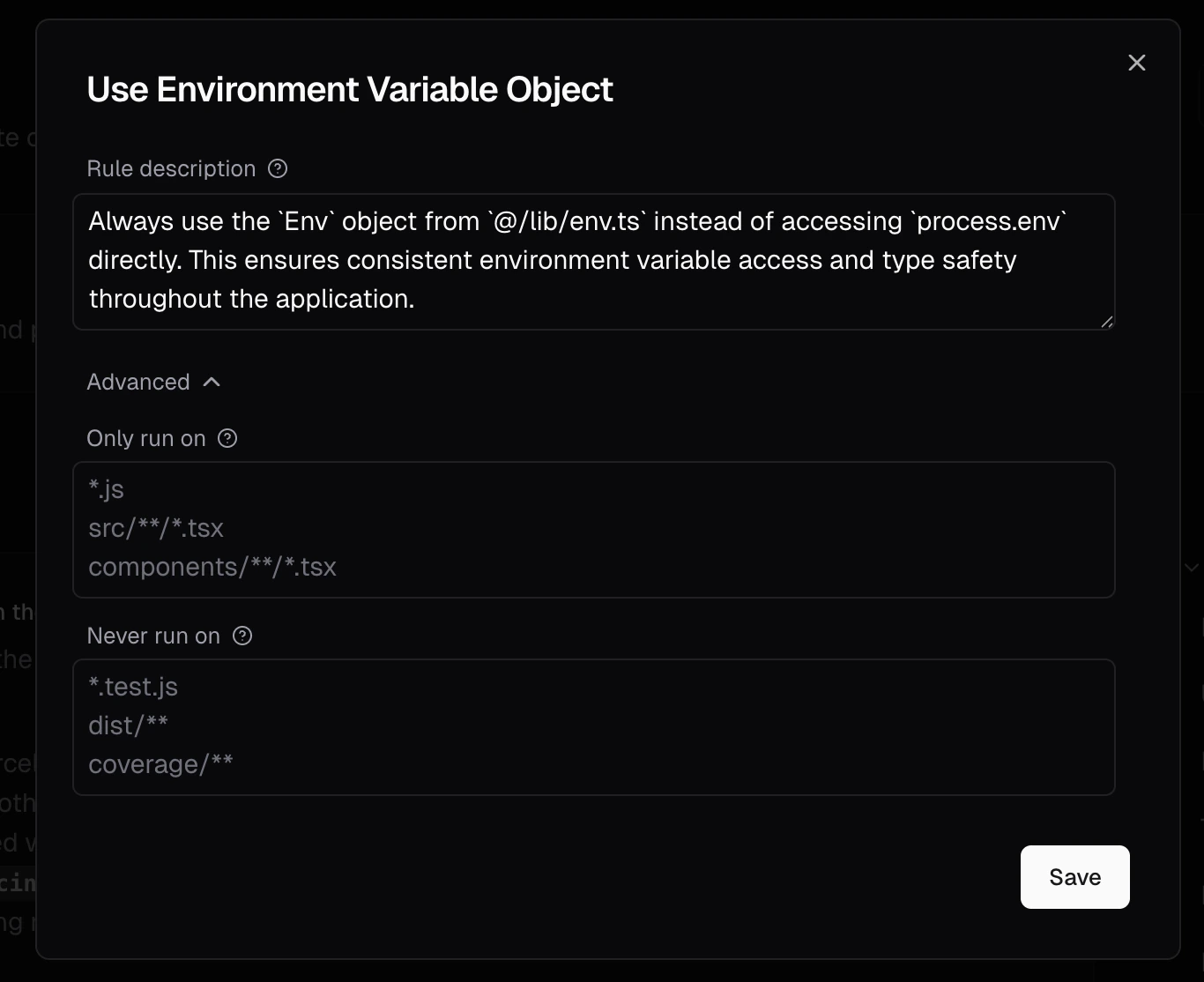
Each custom rule includes:
1. **A Name**\
A concise title, like "Prevent N+1 Queries" or "Require Sentry Error Handling."
2. **A Description**\
A clear, natural-language instruction the AI will use, such as "Flag code that may cause multiple database calls inside loops."
3. **Optional Path Filters**\
Use [Glob patterns](https://en.wikipedia.org/wiki/Glob_\(programming\)) to limit where the rule applies (or exclude certain paths). This is especially helpful for monorepos, where different directories often require different rules.
For example:
* **Include**: `backend/**` to apply the rule only to files under a `backend` folder.
* **Exclude**: `!tests/**` to ignore test files and focus on production code.
## Creating a custom rule
To define a rule, navigate to the **AI review** page in cubic and click "Add rule".
Each custom rule includes:
1. **A Name**\
A concise title, like "Prevent N+1 Queries" or "Require Sentry Error Handling."
2. **A Description**\
A clear, natural-language instruction the AI will use, such as "Flag code that may cause multiple database calls inside loops."
3. **Optional Path Filters**\
Use [Glob patterns](https://en.wikipedia.org/wiki/Glob_\(programming\)) to limit where the rule applies (or exclude certain paths). This is especially helpful for monorepos, where different directories often require different rules.
For example:
* **Include**: `backend/**` to apply the rule only to files under a `backend` folder.
* **Exclude**: `!tests/**` to ignore test files and focus on production code.
 Custom rules are defined at the repository level, and will be applied to all
pull requests in the repository. This means that you can enforce different
custom rules for each repository.
## Example custom rules
* **"Flag potential N+1 queries"**\
*Detects patterns that might result in multiple database calls within loops or repeated function calls.*
* **"Wrap external API calls with Sentry error handling"**\
*Identifies external service calls lacking proper Sentry error tracking.*
* **"Require docstrings for public functions"**\
*Highlights any public functions missing descriptive comments or docstrings.*
When a violation of a rule is detected in a pull request, the AI will comment directly on the affected lines.
Be specific and direct when defining rules. For instance, instead of saying,
"Avoid unnecessary logs," say, "Disallow `console.log` statements in
production code."
## Importing rules from Cursor
If your team uses [Cursor](https://www.cursor.so/) rules, you can easily import these into cubic by clicking the **Sync Cursor Rules** button on the AI review page.
cubic will analyze your Cursor rule files, suggest suitable custom rules, and let you select which ones you'd like to enable.
## Suggested and popular rules
On the **Custom Rules** page, you'll also see two helpful sections:
* **Suggested Rules**: Automatically recommended based on your team's codebase, past comments, and review patterns.
* **Popular Rules**: Common rules frequently adopted by other teams and similar projects.
These sections can help you quickly establish effective review guidelines or inspire new rules you hadn't considered.
## Limitations
* **Single check per PR**: cubic currently performs rule checks only once when the pull request is first opened. Subsequent commits won't trigger additional checks yet.
* **Potential false positives**: Occasionally, the AI might incorrectly flag or overlook certain scenarios. Consider AI feedback as helpful guidance rather than definitive judgments.
## Best practices for custom rules
* **Clear and specific**: Rules should clearly communicate exactly what the AI should look for.
* **Complement existing tools**: Custom rules should focus on checks that standard tools like ESLint or Prettier might miss.
* **Leverage path filters**: When working with monorepos, use Glob patterns to apply or exclude rules in specific folders, ensuring you only flag relevant sections of your code.
## Next steps
[**Overview**](/ai-review/overview): Understand how cubic reviews pull requests by default.
Custom rules are defined at the repository level, and will be applied to all
pull requests in the repository. This means that you can enforce different
custom rules for each repository.
## Example custom rules
* **"Flag potential N+1 queries"**\
*Detects patterns that might result in multiple database calls within loops or repeated function calls.*
* **"Wrap external API calls with Sentry error handling"**\
*Identifies external service calls lacking proper Sentry error tracking.*
* **"Require docstrings for public functions"**\
*Highlights any public functions missing descriptive comments or docstrings.*
When a violation of a rule is detected in a pull request, the AI will comment directly on the affected lines.
Be specific and direct when defining rules. For instance, instead of saying,
"Avoid unnecessary logs," say, "Disallow `console.log` statements in
production code."
## Importing rules from Cursor
If your team uses [Cursor](https://www.cursor.so/) rules, you can easily import these into cubic by clicking the **Sync Cursor Rules** button on the AI review page.
cubic will analyze your Cursor rule files, suggest suitable custom rules, and let you select which ones you'd like to enable.
## Suggested and popular rules
On the **Custom Rules** page, you'll also see two helpful sections:
* **Suggested Rules**: Automatically recommended based on your team's codebase, past comments, and review patterns.
* **Popular Rules**: Common rules frequently adopted by other teams and similar projects.
These sections can help you quickly establish effective review guidelines or inspire new rules you hadn't considered.
## Limitations
* **Single check per PR**: cubic currently performs rule checks only once when the pull request is first opened. Subsequent commits won't trigger additional checks yet.
* **Potential false positives**: Occasionally, the AI might incorrectly flag or overlook certain scenarios. Consider AI feedback as helpful guidance rather than definitive judgments.
## Best practices for custom rules
* **Clear and specific**: Rules should clearly communicate exactly what the AI should look for.
* **Complement existing tools**: Custom rules should focus on checks that standard tools like ESLint or Prettier might miss.
* **Leverage path filters**: When working with monorepos, use Glob patterns to apply or exclude rules in specific folders, ensuring you only flag relevant sections of your code.
## Next steps
[**Overview**](/ai-review/overview): Understand how cubic reviews pull requests by default.