
- Seat-based billing: You are billed based on the number of active seats you assign to your team members (GitHub users).
- Flexible seat management: You can manage seat assignments at any time, both during your free trial and after it ends.
- Customizable checkout: When you purchase a subscription, you select the exact number of seats you need.
- Subscription management: Seat assignments and active seats can be viewed and managed through the subscription tab in your settings: https://www.cubic.io/settings?tab=subscription
Automatic seat assignment for new developers
You can choose to automatically assign seats to new developers who join your linked GitHub organization. This setting can be toggled in your subscription settings. When enabled, any new developer joining your GitHub organization will automatically be assigned a cubic seat and included in your billing. Conversely, if a developer leaves your organization, their seat will be automatically removed, and you will no longer be billed for them.- Compatibility with manual selection: This feature works alongside manual seat selection. For example, if you have manually assigned seats to 3 out of 10 developers in your organization and then enable the “Assign seats to new developers” toggle, when an 11th developer joins the organization, they will automatically receive a cubic seat, bringing your total assigned seats to 4.
Free trial
During the free trial period, you can assign as many developer seats as you like to evaluate cubic with your team. Billing will only begin after the trial ends and is based on the number of seats you select at checkout. If you have any further questions about billing, please contact support.Frequently asked questions
How do I assign seats to specific developers?
How do I assign seats to specific developers?
After your trial ends, go to Settings → Subscription and click “Upgrade”.
- Choose Seat Count: At checkout, on the left side of the checkout page, specify the total number of developer seats you need.
- Assign Seats: After purchasing, return to Settings → Subscription. You’ll find a list of your GitHub organization members. Toggle the specific developers you want to assign your purchased seats to. This lets you pay only for active developers, excluding non-coding members or external collaborators.
Is there an annual plan?
Is there an annual plan?
Yes. We offer an annual subscription at a 20% discount off the monthly rate.
Simply select “12 months” on the checkout page, and the discount will apply
automatically.
Where can I apply a coupon code?
Where can I apply a coupon code?
You can enter your coupon or promo code on the subscription checkout screen: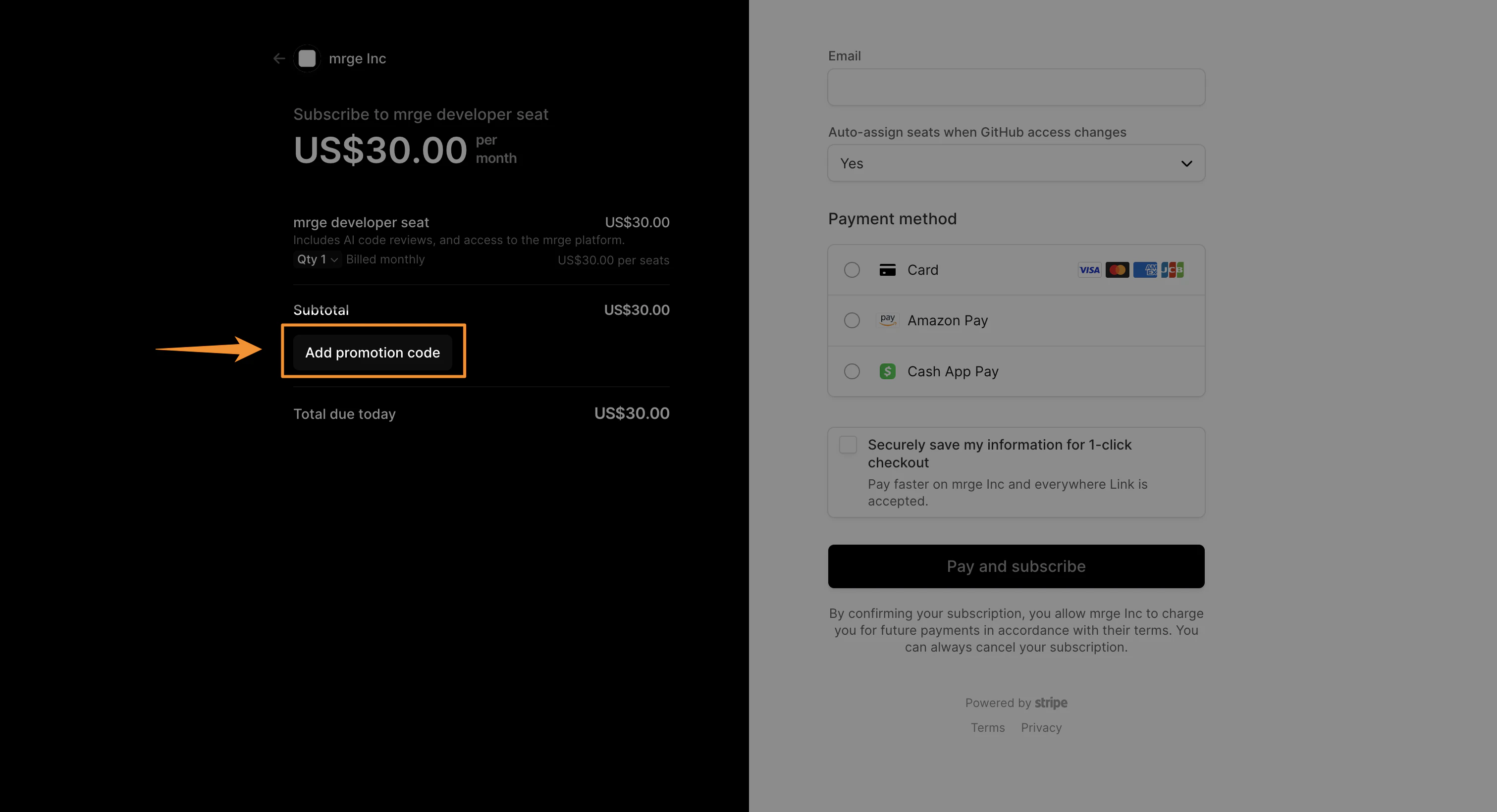
Can I cancel my plan at any time?
Can I cancel my plan at any time?
Absolutely. You can cancel your subscription at any time from Settings →
Subscription → Manage plan. You’ll keep full access until the end of your
current billing period; after that you won’t be billed again.
How do I upgrade or downgrade seats mid-cycle?
How do I upgrade or downgrade seats mid-cycle?
To change your seat count after your subscription has started, go to
Settings → Subscription
and click on Manage plan. This will direct you to our billing portal
(Stripe) where you can adjust the number of seats. Prorated charges or
credits will be applied based on your changes.
What payment methods do you accept?
What payment methods do you accept?
We currently accept all major credit cards (Visa, MasterCard, American
Express) and PayPal. For enterprise customers, we also support ACH bank
transfers—just reach out to support to get set up.
Do you offer discounts for nonprofits or educational institutions?
Do you offer discounts for nonprofits or educational institutions?
Yes! We’re proud to support nonprofits and schools with a special 50%
discount. Please contact
support to verify your
eligibility.
Do you offer free plans for open source projects?
Do you offer free plans for open source projects?
Yes, we offer free access for qualifying open source projects. To apply,
please email us at opensource@cubic.io with
details about your project.
How is pricing calculated if I add seats mid-cycle?
How is pricing calculated if I add seats mid-cycle?
When you increase seats, we calculate the unused portion of your month and
charge only for the prorated difference. If you remove seats, your credit
will apply to your next invoice.
What happens when my free trial ends?
What happens when my free trial ends?
Your free trial lasts 14 days with unlimited seats. Once it ends, you’ll
need to add a payment method and choose a seat count to continue. You won’t
be charged until you upgrade.
Is there a free or pay-as-you-go tier?
Is there a free or pay-as-you-go tier?
We don’t currently offer a limited “free tier” beyond the trial. All
customers move onto a seat-based monthly or annual plan once the trial
finishes.
How do I manage who is assigned a seat?
How do I manage who is assigned a seat?
In Settings →
Subscription, you’ll see a
list of your organization’s GitHub members. Check or uncheck boxes to
activate or deactivate seats in real time.